RAQIA SDR Airband Scanner

Hear the pilots.
See the planes.

Made just for airband: a real scanner, the live plane map and plane messages in plain English, in one simple app. No plugins, no extra programs.

Windows · macOS · Linux · Android phones, tablets and TV
English, Español, 中文, 日本語

Map + messagesADS-B / 1090 MHz
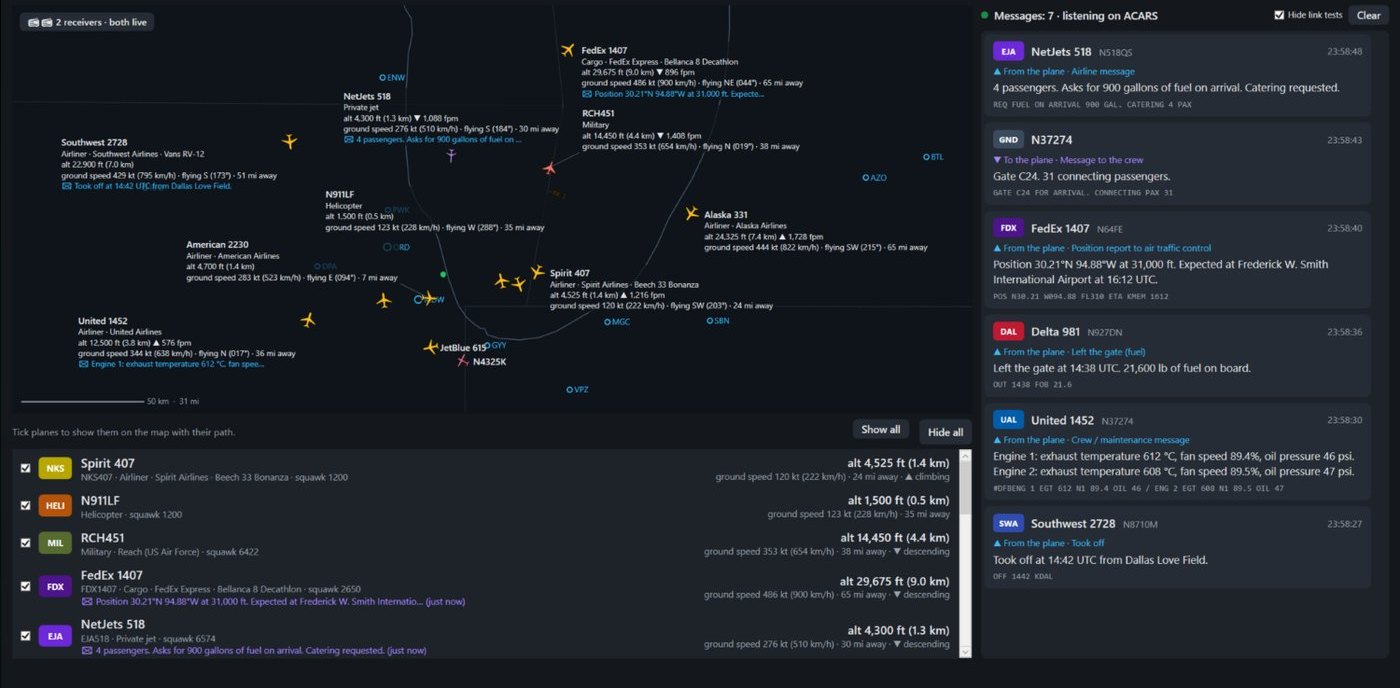
Aircraft on the offline map beside their decoded radio messages

Three ways to follow a flight

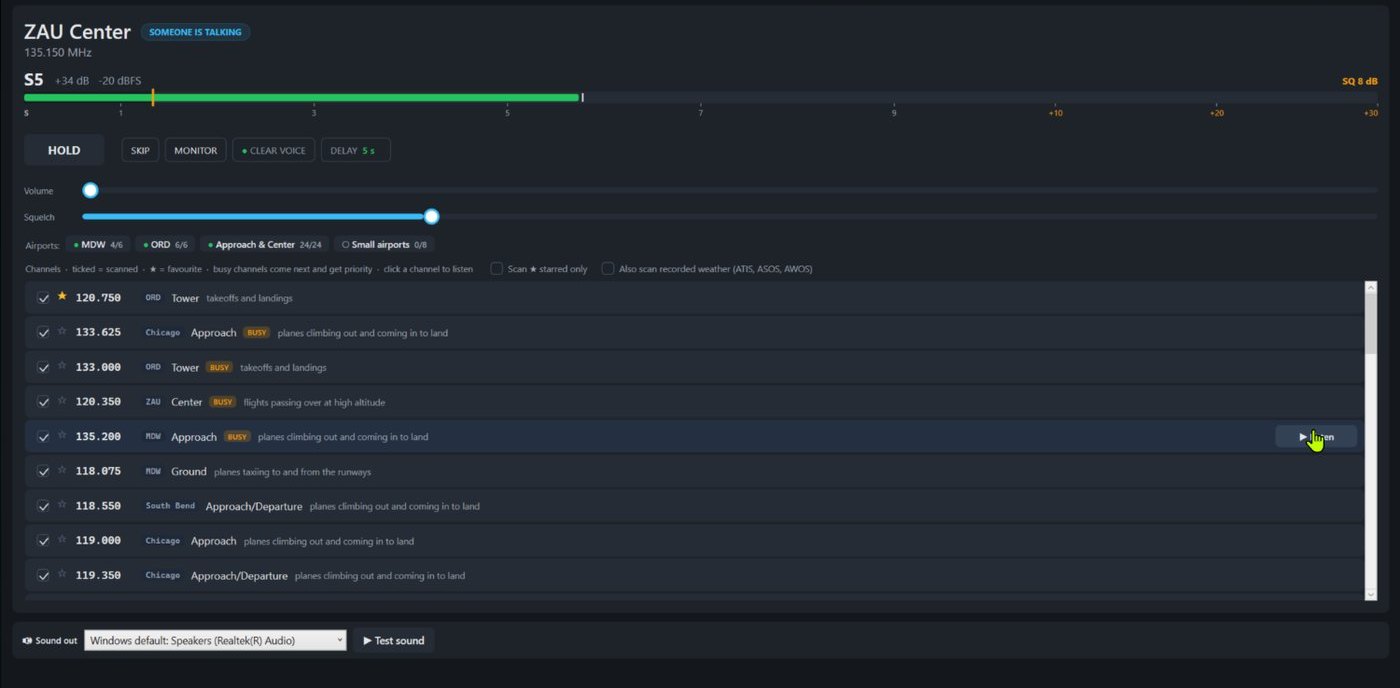
Scanner display with airport channels and their frequencies

Listen

Hear pilots and air traffic control. The scanner finds channels near you from about 11,000 airports in 236 countries. You can add your own frequencies, too.
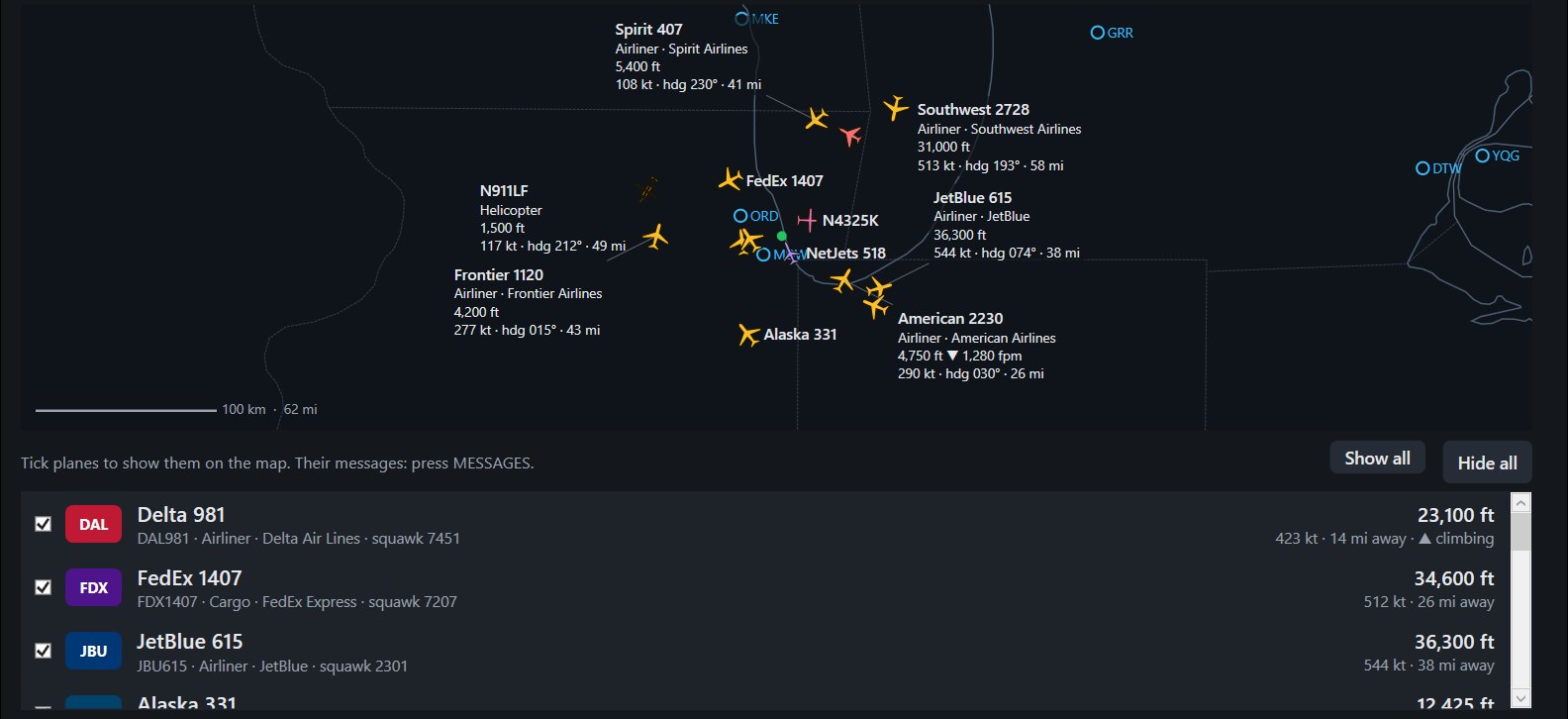
Aircraft positions and flight details on the offline map

Map

See nearby planes on an offline map. The app decodes 1090 MHz ADS-B and shows each plane’s flight, airline, model, altitude and speed.
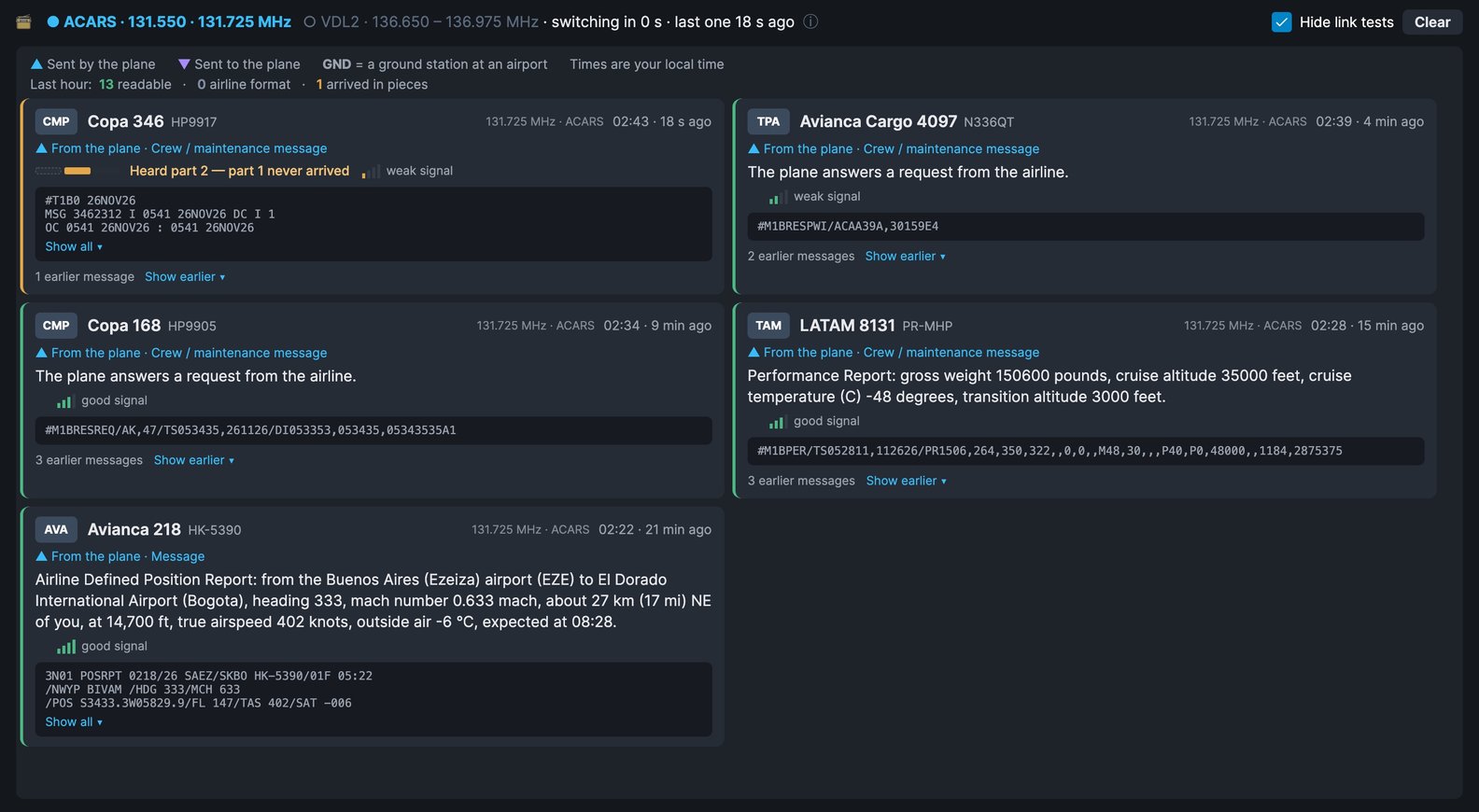
Decoded aircraft messages with plain-English explanations

Messages

Read the ACARS and VDL2 messages planes send. One plain-English sentence explains each report, from take-off times and gates to fuel, positions and engine reports.

Why it's different

Built for one job:
the airband.

Most SDR programs are made for every signal. This one is made just for planes, so everything you need is already set up.

  • Channels found for you

    Pick your town and the scanner already knows the tower, ground, approach and center channels around you: about 11,000 airports in 236 countries.

  • Plane messages in plain English

    ACARS and VDL2 messages explained in one simple sentence each, not raw codes.

  • Our own RTL-SDR driver

    A scanner round in 0.4 s instead of 0.7 s, with no leftover sound from the last channel.

  • CLEAR VOICE

    One button for louder, crisper pilots with much less hiss between words, and voices that stay natural.

  • One app, nothing else to add

    Scanner, plane map and messages together. No plugins, no extra decoder programs, no account, works offline.

  • Works like a handheld scanner

    SCAN, HOLD, SKIP, MONITOR and DELAY, airport buttons and BUSY channels first.

A real scanner, made simple

Scanner controls
SCAN, HOLD, SKIP, MONITOR and DELAY work like a handheld scanner.
★ Favourites and BUSY channels
Star the channels you like. The app learns which channels talk the most and gives them priority when two talk at once.
Airport buttons
Scan or skip a whole airport, Approach & Center, or the small airports in one click.
CLEAR VOICE
Make quiet pilots louder and crisper, with less hiss.
Optimize
Test every gain setting with your antenna. The app keeps the setting that gives the clearest reception.
Strong-signal protection
The app lowers sensitivity when a nearby station is very strong. It raises sensitivity again when the channel is quiet.

Our own RTL-SDR driver

See how it works
0.4 s
One scan of 49 channels, almost twice as fast as the standard free driver at 0.7 s.
26 ms
Time to switch channels.
0 ms
Leftover sound from the last channel. The standard driver leaves 38 ms.
1 program
Scanner, map and messages in one program instead of three.

Two receivers? See and hear at once

With two dongles, the app finds which one hears planes and gives it the map. Available on Windows, macOS and Linux.
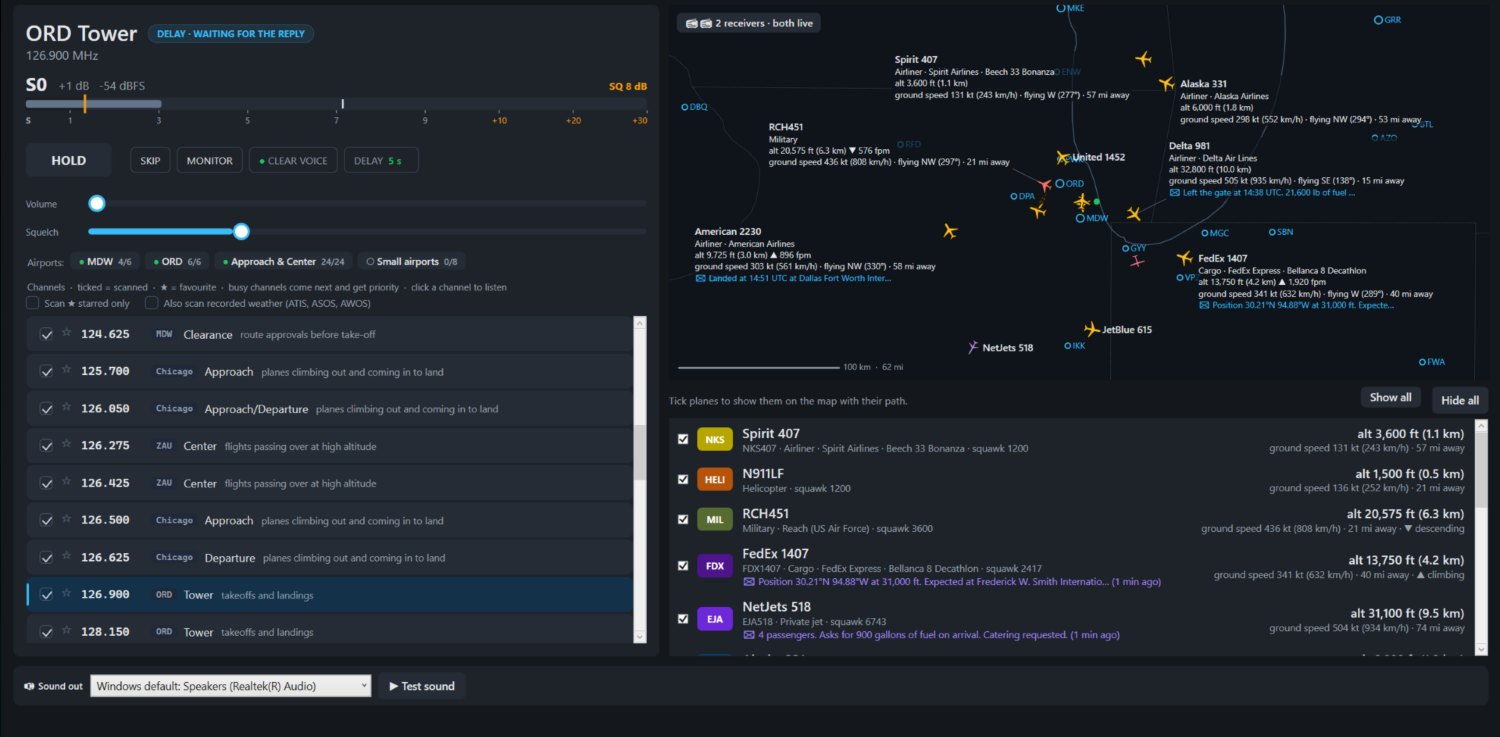
Scanner and live plane map running side by side
Map + voice

The scanner on the left, the planes on the right.

Live plane map beside the aircraft message feed
Map + messages

The planes and their messages, both live.

Technical details

Supported receivers

Windows, macOS and Linux
RTL-SDR dongles (RTL2832U) with an R820T, R820T2, R828D or R860 tuner. These include RTL-SDR Blog V3 and V4, Nooelec NESDR SMArt, Mini 2+ and Nano 3, and similar dongles. SDRplay RSP receivers, Airspy R2 and Mini (beta), and HackRF One (beta) also work.
Android and Android TV
Connect an RTL-SDR dongle with one of the tuners above through USB OTG. Android does not support SDRplay, Airspy, HackRF or RTL-SDR sticks with E4000, FC0012, FC0013 or FC2580 tuners.

Frequencies and antennas

Airband voice
118–137 MHz AM, with 25 kHz and 8.33 kHz channels.
Plane map
ADS-B at 1090 MHz.
Plane messages
ACARS at 130.025–131.850 MHz and VDL2 at 136.650–136.975 MHz.
Antennas
Use an airband antenna (118–137 MHz) for Listen and Messages. Use a 1090 MHz antenna for the Map.

Systems and dongle setup

Windows
Windows 10/11, 64-bit. Click “Set up dongle” inside the app.
macOS
macOS 12 or newer, Apple silicon and Intel. The app is signed and notarized by Apple. Nothing extra to install.
Linux
Linux x64 with a desktop. Add one udev rule as shown in README-LINUX.txt.
Android
Android 8.0 or newer on phones, tablets, Android TV and Google TV. One file supports 64-bit ARM, 32-bit ARM and x86-64. The driver is built in.

Operation and built-in data

One or two receivers
One receiver runs Listen, Map or Messages. Two run Map + Voice or Map + Messages on Windows, macOS and Linux.
Offline data
Channels for about 11,000 airports in 236 countries, complete US channel lists from FAA data, 459,000+ aircraft models, 1,100+ airline names and an offline map.
Privacy and languages
No account. The Android app has no internet permission. Available in English, Español, 中文 and 日本語.

Free download

  • Keep the airband scanner and worldwide channel lists for good.
  • Keep the live plane map for good.
  • Every feature is switched on for the first 30 days.

On Android TV / Google TV

  1. Install a downloader app from the TV’s app store, or copy the .apk file to a USB stick.
  2. Open the .apk and allow installing unknown apps when the TV asks.
  3. Start RAQIA Airband from the home screen and search for your city. Plug the dongle into the TV’s USB port or a powered USB-C hub, then press OK to confirm.

TV remote Use the arrows to move and OK to select. On the Map, ◀ ▶ step from plane to plane and ▲ ▼ zoom.

Meet the developer

Juan Pablo Pacheco, a ham radio operator, builds the RAQIA radio apps.
Into ham radio, RF, SDR or aviation? Let's connect on LinkedIn.
I share new radio apps, RF projects and what I learn along the way.

Support

Report a problem, ask a question, or get help with a licence key or refund.

See the terms.